An SVG is a document as well as a picture
SVG can describe paths, shapes and text, but its document format also supports features that go beyond a static icon. That matters when you receive markup from an unfamiliar source. A browser may display a convincing picture without making its dependencies or active elements obvious. The first useful question is therefore what the document contains and what the destination permits, rather than how many bytes an optimizer can remove.
The tool labeled SVG Optimizer in Orbit is a conservative sanitizer and serializer. It is not a comprehensive geometry optimizer or a guarantee that arbitrary artwork is safe in every embedding context. It does not promise smaller output. Its purpose is to produce a restricted SVG derivative that you can inspect, with explicit exclusions that may change how complex artwork looks.
Establish a simple static control
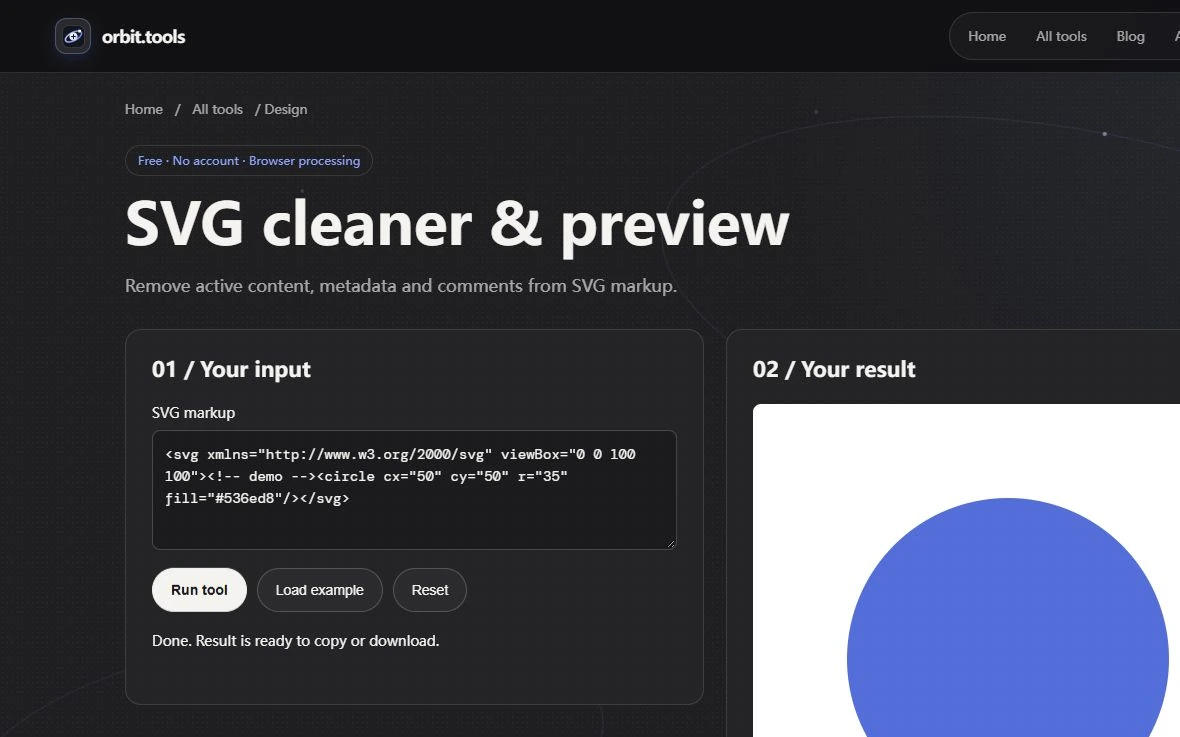
Begin with an SVG root containing a viewBox and a circle whose fill is expressed as an attribute. A compact test is a 100 by 100 viewBox with a circle centered at 50,50, radius 30 and fill #536ed8. Run the tool and inspect the preview and serialized output. The circle should remain visible because its geometry and presentation do not depend on an external file, an embedded stylesheet or a script.
Keep that control before trying a complex illustration. If the document lacks a valid SVG root or has malformed XML, the tool should reject it. Fix the structural error in a disposable copy rather than repeatedly submitting the same malformed document. The success case establishes the allowed static workflow; the failure case establishes that a rendered-looking fragment is not automatically an acceptable SVG document.
Know what the cleaner deliberately removes
The local configuration excludes scripts, foreignObject content, image elements, links and animation elements. It also removes style attributes, style elements and href references. These are implementation choices for a narrow workflow, not a claim that every use of those SVG features is malicious. A legitimate logo may depend on one of them and therefore lose essential content when processed here.
For example, a circle colored only through an embedded stylesheet may lose that styling, while the control circle with a fill attribute remains intelligible. An illustration assembled from referenced symbols can lose content when its references are removed. Do not interpret a smaller file as evidence that the missing pieces were unnecessary. Compare the intended artwork, not just the count of characters in the result.
Separate sanitization from optimization
Path simplification, precision reduction and repeated-shape deduplication are distinct optimization techniques. This tool does not expose those transformations or a visual tolerance setting. If you need a production illustration optimized for size, use a workflow designed for that task and compare the final rendering. Running this cleaner several times will not turn it into a geometric optimizer or restore elements removed during the first pass.
The downloaded file can even be larger because serialization changes representation. That is not inherently an error if the restricted document meets your needs. Conversely, a very small result can be wrong if it contains only the root and a fragment of the original drawing. Write an acceptance condition such as all three bars and their labels remain present. This makes review concrete instead of rewarding size reduction without regard to meaning.
Inspect the destination context
Review the output at a small icon size and at a larger size. Look for missing shapes, lost fills, clipped strokes, changed text and unexpected whitespace. Then test it in the same embedding context as the destination: an image file and inline SVG do not have identical surrounding behavior. A successful local preview cannot establish that every consuming application will interpret the file as intended.
If the artwork relies on fonts, external resources or animation, retain the original and choose a more suitable export path. Converting complex art to a raster derivative in a trusted editor may be appropriate when editability and scalability are unnecessary, but that is a separate decision. The local raster tools do not accept SVG as their source, so do not promise a direct in-site SVG-to-PNG conversion that the interface does not provide.
Preserve a reviewable source and derivative
Store the received SVG separately from the cleaned output and note which visible properties were checked. Do not describe an unreviewed input as verified safe merely because the sanitizer returned text. Sanitizers depend on maintained code and configuration, and changing the result afterward can introduce new behavior. Keep dependencies current and apply the destination's own content rules where the file will be published.
For a handover, include the static control, the specific input under review and a short list of differences accepted or rejected. If a legitimate dependency was removed, state that the tool is unsuitable for that asset instead of silently shipping an incomplete logo. The strongest outcome is a restricted derivative whose remaining content has been checked, with the original recoverable and the limits of the cleaning operation understood.