Three similar-looking strings can require different operations
An encoded-looking string is not enough information to choose a decoder. Ask where it came from and what the receiver expects. A text payload transported as Base64, a query parameter escaped for a URL and a token with dot-separated sections cross different boundaries. Applying several decoders until something readable appears can conceal the actual contract and create a result that nobody else can reproduce reliably.
Orbit separates these tasks into Base64 Encoder / Decoder, URL Encoder / Decoder and JWT Decoder. The tools work on text rather than arbitrary uploaded binary files. They do not make information confidential. Use synthetic inputs while learning, then record the source encoding and intended destination beside a real transformation. A readable output is useful evidence about representation; it is not proof that the sender was trustworthy.
Base64 is a reversible text representation
Encode the text Hello and expect SGVsbG8=. Decode that result and expect the same five letters, including their capitalization. This round trip is a small acceptance check. Add an accented character or another non-ASCII character and repeat it: the tool encodes the UTF-8 bytes, then decodes them as UTF-8 text. It is not limited to the older assumption that one visible character fits in one byte.
The decoder rejects invalid Base64 and byte sequences that are not valid UTF-8. A rejection does not prove that the data is corrupt in every possible context. It may represent an image or another binary object that this text-oriented tool is not meant to display. Use Image to Base64 when starting with a supported raster image, and retain the data URL prefix when the receiving field expects an image URL rather than raw Base64.
URL components have their own punctuation rules
Enter a+b c in URL Encoder and expect a%2Bb%20c. The plus sign becomes %2B and the space becomes %20. Decode the result to recover the original. This behavior follows URL component encoding. It is different from a form parser that interprets a plus sign as a space. In the local decoder, a literal plus sign remains a plus sign unless it was percent encoded differently.
Encode a parameter value, not an entire assembled URL whose separators you intend to keep active. An ampersand inside a value must not be mistaken for the separator between parameters. Conversely, encoding a complete URL as one component will also escape its colon and slashes. Decide which layer you are constructing before applying the operation, and avoid double encoding a value that has already crossed that boundary.
A JWT preview is an unverified claim display
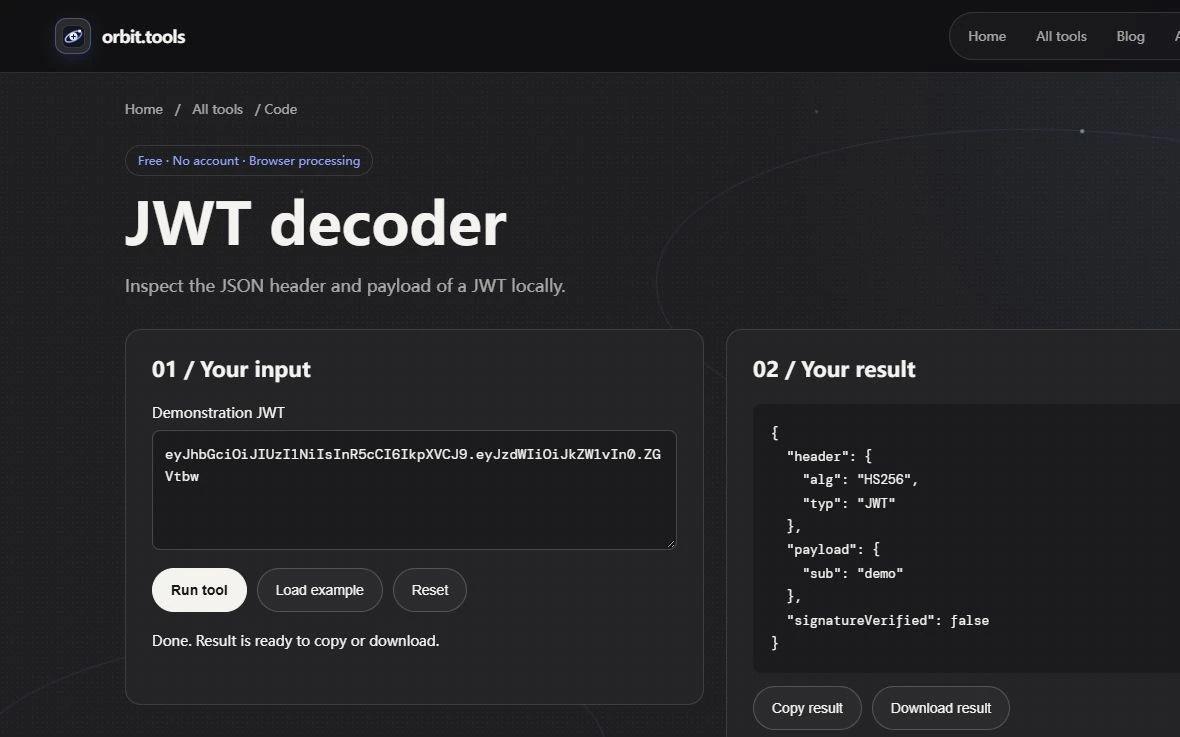
The JWT Decoder accepts three nonempty dot-separated parts, decodes the first two as Base64URL JSON and displays a header and payload. It explicitly reports signatureVerified as false. This is an inspection tool for that token shape, not a complete implementation of every JWT serialization. An encrypted token or another structure may not fit its accepted input at all.
Someone can construct a payload that says admin is true without possessing the key needed to make a valid signature. Reading that payload does not authorize access. Verification requires the application's trusted keys, allowed algorithms and claim checks, including its intended issuer and audience. The local decoder does not perform those checks, does not contact an issuer and does not decide whether an expiration claim should be accepted by your application.
Preserve the distinction in bug reports
For an encoding bug, include a harmless original value, the operation, the output and the expected receiver behavior. For a token display issue, use a synthetic token and identify which section fails to decode. Avoid placing live access tokens in screenshots or shared tickets. Their payload may already be readable, and possession of the complete token can carry consequences independent of whether this decoder verifies it.
If a round trip changes text, first check whitespace, percent escaping and the encoding layer rather than assuming the tools are interchangeable. A data URL includes metadata before its Base64 payload; a JWT uses Base64URL conventions; a query value uses percent escapes. Naming the boundary often resolves the apparent contradiction without another round of blind conversions.
Stop when the representation is correct
Successful decoding is the end of the representation task. Validate the resulting data separately in the system that consumes it. A JSON payload still needs a schema or application contract, a URL still needs an appropriate destination and a token still needs cryptographic verification. Keeping these responsibilities separate makes the workflow easier to audit and prevents a convenient local preview from becoming an accidental security decision.
Check a failure without changing the contract
Try a malformed percent escape such as %ZZ in URL Decoder. It should produce an error rather than inventing a replacement character and presenting success. Then restore a valid encoded value and verify the round trip again. For Base64, use a deliberately invalid character as the negative case. These small failures test the selected operation; they do not justify switching to a different decoding scheme until the source format has been identified. Keep both cases in a reproduction note so another person can tell an expected rejection from a regression.